Realme C63 RMX3939 Hard Reset & Flag=0 Fix – Free Tool 2025
Realme C63 RMX3939 Hard Reset & Flag=0 Fix – Free Tool & Full Guide (2025)
Introduction
If you’re struggling to Realme C63 RMX3939 Hard Reset, or if you keep seeing the “flag=0” error in recovery mode, then this guide is exactly what you need. Many users encounter problems like no wipe data option, factory key transfer errors, or being unable to factory reset. Fortunately, there is a solution!
In this tutorial, we will walk you through the process step by step. Moreover, we will use TFT Unlock Tool and Avengers Box Main Module v1.8 to fix these issues without test points or paid tools. So, let’s get started!
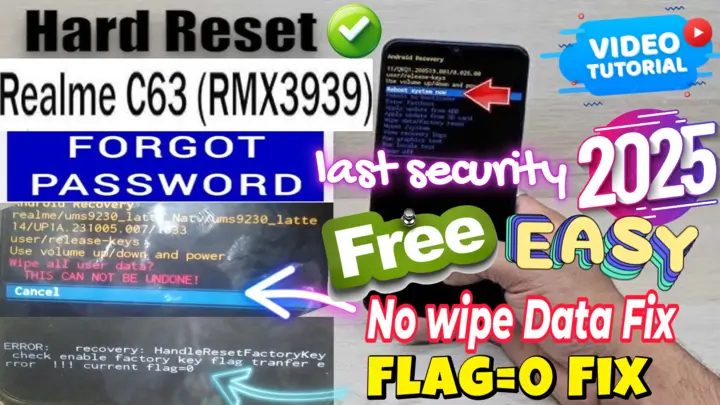
Common Issues with Realme C63 Hard Reset
When trying to reset your Realme C63 RMX3939, you might experience several problems. For instance, here are some of the most common issues:
🔴 No Wipe Data Option in Recovery Mode – You enter recovery mode, but there is no option to erase data.
🔴 Factory Key Transfer Error – You get a message that says the factory key transfer failed.
🔴 Flag=0 Issue – Can’t Hard Reset the Phone – The system prevents you from performing a reset.
🔴 Recovery Mode Key Check Failed – You cannot use the recovery menu properly.
🔴 Phone Stuck on Realme Logo after Reset – Your device won’t boot after trying to reset it.
🔴 Fix >> error: recovery: handle reset factory key check enable factory key flag transsfer error !!! current flag=0
However, don’t worry! This guide will show you how to fix all these issues quickly and easily.
Required Tools & Downloads
Before we move on to the fixing process, it is essential to prepare everything you need. Make sure to download and install the following tools on your PC:
✅ TFT Unlock Tool
✅ Avengers Box Main Module v1.8
✅ Realme SPD USB Drivers
✅ A Good USB Cable to connect your phone
⚠️ Important: Always back up your data before proceeding, as this method will erase everything on your device. Once you have these tools ready, let’s move to the method.
Fixing Hard Reset & Flag=0 Error
To begin, follow these steps carefully:
1️⃣ First, download and install TFT Unlock Tool on your PC.
2️⃣ Next, download and install Avengers Box Main Module v1.8 on your PC.
3️⃣ Then,turn off phone and watch video step by step.
4️⃣ Finally, your phone Will reboot and set it up as new! 🎉
✅ Hard reset complete!
Conclusion
By following this guide, you can successfully hard reset your Realme (C63 RMX3939), fix the flag=0 error, and remove factory key transfer issues using TFT Unlock Tool and Avengers Box Main Module v1.8. This method is completely free and safe, plus it works on Android 13 and 14.
🔹 If you found this guide helpful, please share it and subscribe to our YouTube channel MxEgy-Tech for more tutorials! 💬🚀
انقر فوق السهم لإظهار الترجمة باللغة العربيه
ريلمي C63 RMX3939 فورمات وإصلاح خطأ Flag=0 – أداة مجانية ودليل شامل (2025)
المقدمة
إذا كنت تواجه صعوبة في إعادة ضبط مصنع لهاتف ريلمي C63 RMX3939 أو تستمر في رؤية خطأ “flag=0” في وضع الاسترداد، فهذا الدليل مخصص لك. يواجه العديد من المستخدمين مشكلات مثل عدم وجود خيار لمسح البيانات، أخطاء نقل مفتاح المصنع، أو عدم القدرة على إعادة ضبط الهاتف. لكن لا تقلق، هناك حل!
في هذا الشرح، سنرشدك خلال العملية خطوة بخطوة. بالإضافة إلى ذلك، سنستخدم TFT Unlock Tool و Avengers Box Main Module v1.8 لحل هذه المشكلات بدون الحاجة إلى نقاط اختبار أو أدوات مدفوعة. فلنبدأ الآن!
أبرز المشاكل عند إعادة ضبط مصنع ريلمي C63 RMX3939
عند محاولة إعادة ضبط المصنع لهاتف ريلمي C63 RMX3939، قد تواجه عدة مشكلات. على سبيل المثال، إليك بعض المشاكل الأكثر شيوعًا:
🔴 عدم وجود خيار لمسح البيانات في وضع الاسترداد – عند دخول وضع الاسترداد، لا تجد خيار مسح البيانات.
🔴 خطأ في نقل مفتاح المصنع – يظهر لك إشعار بفشل عملية نقل مفتاح المصنع.
🔴 مشكلة “Flag=0” – لا يمكن إعادة ضبط الهاتف – النظام يمنعك من إجراء الفورمات.
🔴 فشل التحقق من مفتاح وضع الاسترداد – لا يمكنك استخدام قائمة الاسترداد بشكل صحيح.
🔴 توقف الهاتف عند شعار Realme بعد إعادة الضبط – الجهاز لا يُقلع بعد محاولة إعادة الضبط.
لكن لا تقلق! سيُرشدك هذا الدليل إلى حل جميع هذه المشكلات بسرعة وسهولة.
الأدوات والملفات المطلوبة
قبل البدء في عملية الإصلاح، من الضروري تجهيز جميع الأدوات اللازمة. تأكد من تنزيل وتثبيت الأدوات التالية على جهاز الكمبيوتر الخاص بك:
✅ TFT Unlock Tool
✅ Avengers Box Main Module v1.8
✅ Realme SPD USB Drivers
✅ كابل USB عالي الجودة لتوصيل الهاتف
⚠️ مهم: قم دائمًا بعمل نسخة احتياطية لبياناتك قبل المتابعة، حيث إن هذه الطريقة ستؤدي إلى مسح جميع البيانات من الجهاز. بمجرد تجهيز الأدوات، لنبدأ بالطريقة الأولى.
إصلاح Hard Reset وخطأ Flag=0
لبدء عملية الإصلاح، اتبع الخطوات التالية بدقة:
1️⃣ أولًا، قم بتنزيل وتثبيت TFT Unlock Tool على جهاز الكمبيوتر الخاص بك.
2️⃣ بعد ذلك، قم بتنزيل وتثبيت Avengers Box Main Module v1.8 على جهاز الكمبيوتر.
3️⃣ ثم، قم بإيقاف تشغيل الهاتف وشاهد الفيديو التعليمي خطوة بخطوة.
4️⃣ أخيرًا، سيتم إعادة تشغيل الهاتف، ثم يمكنك إعداده كجهاز جديد! 🎉
✅ تمت عملية إعادة ضبط المصنع بنجاح! .
الخاتمة
من خلال اتباع هذا الدليل، يمكنك إعادة ضبط المصنع لهاتف ريلمي C63 RMX3939 بنجاح، وإصلاح خطأ flag=0، والتخلص من مشاكل نقل مفتاح المصنع باستخدام TFT Unlock Tool و Avengers Box Main Module v1.8. هذه الطريقة مجانية تمامًا وآمنة، كما أنها تعمل على أنظمة Android 13 و 14.
🔹 إذا وجدت هذا الشرح مفيدًا، لا تنسَ مشاركته والاشتراك في قناتنا على يوتيوب MxEgy-Tech للمزيد من الشروحات! 💬🚀
Download Realme (C63 RMX3939) Hard Reset Tools
Go to the Download Page
للذهاب لصفحة التحميل
يمكنك من خلال الضغط علي الزر التالي الذهاب لصفحة فحص وتحضير الروابط.
You can go to the link preparation and check page by pressing the button below.

PASS/كلمه السر :mxegy frp
⚡ تنبيه قانوني | Legal Notice:
This tutorial is intended for educational purposes only. We do not endorse or support any illegal activities. Therefore, always ensure that you have the legal right to unlock and modify your device before proceeding with any FRP bypass or account unlocking methods.
هذا الدرس لأغراض تعليمية فقط. نحن لا نؤيد أو ندعم أي أنشطة غير قانونية. تأكد دائمًا من أنك تملك الحق القانوني في فتح وتعديل جهازك قبل المتابعة في أي طرق لتخطي حساب جوجل أو فتح الحسابات.
للمزيد من المعلومات وحل المشكلات الأخرى، يمكنك زيارة موقعنا الرسمي
Your support truly means the world to me! Whether it’s by sharing, subscribing, watching ads, or contributing in any way, every little bit plays a crucial role in helping me create more content. Without your support, this journey wouldn’t be possible. So, I want to take a moment to express my sincere thanks for being a part of this exciting adventure! Together, we can continue to grow and achieve even more. ❤️

Top Free Mobile Repair Tools & Mobile Repair Guides 2025
Discover More Free Mobile Repair Tools of 2025, which include a range of advanced technical solutions, Mobile Repair Guides. These tools offer the ability to unlock phones,bypass Google account verification, fix IMEI and serial numbers, as well as repair network issues and revive dead boot devices. Whether you’re looking to fix your personal device or need professional tools to assist with mobile repairs, you’ll find a collection of free tools perfect for all of this and more. Read more about each tool to get detailed instructions on how to use them properly. These tools cater to the needs of all users, whether beginners or professionals, and support most brands like Samsung, Huawei, Xiaomi, Oppo, and others.


Comments
Post a Comment