Realme C21y Hard Reset and FRP Bypass Solution 2025 One Click Tool
Realme C21y Hard Reset and FRP Bypass Solution 2025 One Click Tool
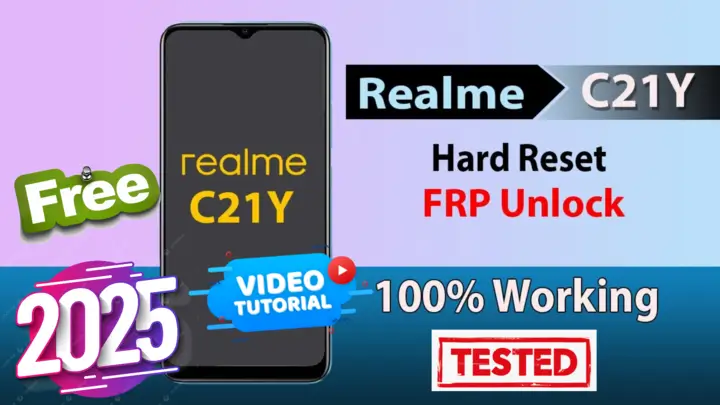
Are you struggling to Realme C21y Hard Reset and FRP Bypass? Look no further! In this article, we provide you with a step-by-step guide to solve these issues easily using a free tool. This method does not require any paid tools or specialized boxes, making it accessible for everyone.
حل مشكلة إعادة ضبط المصنع وتخطي قفل FRP لهاتف Realme C21y
هل تواجه صعوبة في إعادة ضبط هاتف Realme C21y أو تخطي قفل Google FRP؟ لا تقلق! في هذه المقالة، نوفر لك دليلًا خطوة بخطوة لحل هذه المشكلات بسهولة باستخدام أداة مجانية. هذه الطريقة لا تتطلب أدوات مدفوعة أو صناديق متخصصة، مما يجعلها متاحة للجميع.
ما هو قفل FRP؟
قفل FRP (حماية إعاده ضبط المصنع) هو ميزة أمان قدمتها Google لحماية أجهزة Android من الوصول غير المصرح به بعد ضبط المصنع. ورغم أنه يضمن أمان البيانات، إلا أنه قد يؤدي أحيانًا إلى قفل المستخدمين الشرعيين إذا نسوا بيانات حساب Google الخاص بهم.
لماذا تقوم بإعادة ضبط المصنع؟
ضبط المصنع تعيد جهازك إلى إعداداته الأصلية، مما يؤدي إلى إزالة جميع البيانات، التطبيقات، والتخصيصات. يكون ذلك مفيدًا في الحالات التالية:
- إذا نسيت كلمة مرور قفل الشاشة أو النمط.
- إذا كان هاتفك يعمل ببطء أو يواجه أخطاء.
- إذا كنت تستعد لبيع الجهاز.
دليل خطوة بخطوة لإعادة ضبط المصنع وتخطي FRP لهاتف Realme C21y
1. كيفية إعادة ضبط المصنع:
- قم بإيقاف تشغيل هاتفك Realme C21y.
- شاهد الفيديو الخاص بالخطوات بالتفصيل.
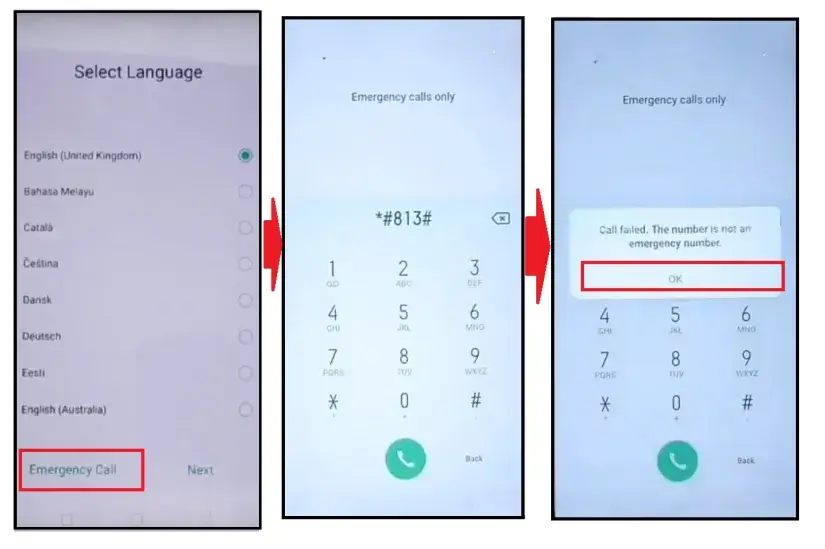
2. كيفية تخطي قفل Google FRP:
فوائد استخدام هذه الطريقة
- مجانية تمامًا: لا حاجة لتكاليف إضافية أو اشتراكات.
- سريعة وبسيطة: أداة سهلة الاستخدام مع إرشادات خطوة بخطوة.
- لا تتطلب خبرة تقنية: مناسبة للمبتدئين.
الخاتمة
لم يكن فتح هاتف Realme C21y أسهل من هذا! باتباع هذا الدليل، يمكنك ضبط المصنع وتخطي قفل FRP بكل سهولة. لا تنسَ مشاركة هذا المقال مع الآخرين الذين قد يحتاجون إلى المساعدة.
ابقَ على اطلاع بأحدث الحلول التقنية من خلال متابعة MxEgyTech. لمزيد من الشروحات، زوروا قناتنا على YouTube أو استكشفوا أدلة أخرى على موقعنا.
Click the arrow to reveal the translation in English
Realme C21y Hard Reset and FRP Bypass Solution
Are you struggling to reset your Realme C21y or bypass the Google FRP lock? Look no further! In this article, we provide you with a step-by-step guide to solve these issues easily using a free tool. This method does not require any paid tools or specialized boxes, making it accessible for everyone.
What is FRP Lock?
FRP (Factory Reset Protection) is a security feature introduced by Google to protect Android devices from unauthorized access after a factory reset. While it ensures data security, it can sometimes lock out legitimate users who forget their Google account credentials.
Why Perform a Hard Reset?
A hard reset restores your device to its factory settings, removing all data, apps, and customizations. This is useful if:
- You’ve forgotten your screen lock password or pattern.
- Your phone is running slow or encountering errors.
- You’re preparing the device for resale.
Step-by-Step Guide to Hard Reset and Bypass FRP for Realme C21y
1. How to Perform a Hard Reset:
- Power off your Realme C21y.
- watch video step by step.
2. How to Bypass Google FRP Lock:
Benefits of Using This Method
- Free to Use: No additional costs or subscriptions required.
- Quick and Simple: User-friendly tool with step-by-step guidance.
- No Technical Expertise Needed: Suitable for beginners.
Conclusion
Unlocking your Realme C21y has never been easier! By following this guide, you can perform a hard reset and bypass the FRP lock effortlessly. Don’t forget to share this article with others who might find it helpful.
Stay updated with the latest tech solutions by following MxEgyTech. For more tutorials, visit our YouTube channel or explore other guides on our website.
يمكنك تنزيل الادوات من الرابط التالي:
Go to the Download Page
للذهاب لصفحة التحميل
يمكنك من خلال الضغط علي الزر التالي الذهاب لصفحة فحص وتحضير الروابط.
You can go to the link preparation and check page by pressing the button below.

PASS/كلمه السر :mxegy frp
⚡ تنبيه قانوني | Legal Notice:
This tutorial is for educational purposes only. We do not endorse or support any illegal activities. Always ensure that you have the legal right to unlock and modify your device before proceeding with any FRP bypass or account unlocking methods.
هذا الدرس لأغراض تعليمية فقط. نحن لا نؤيد أو ندعم أي أنشطة غير قانونية. تأكد دائمًا من أنك تملك الحق القانوني في فتح وتعديل جهازك قبل المتابعة في أي طرق لتخطي حساب جوجل أو فتح الحسابات.
للمزيد من المعلومات وحل المشكلات الأخرى، يمكنك زيارة موقعنا الرسمي
Your support means the world to me! Whether it’s by sharing, subscribing, watching ads, or contributing in any way – every little bit helps me create more content. Thank you for being part of this journey! ❤️



Top Free Mobile Repair Tools & Mobile Repair Guides 2025
Discover More Free Mobile Repair Tools of 2025, which include a range of advanced technical solutions, Mobile Repair Guides. These tools offer the ability to unlock phones,bypass Google account verification, fix IMEI and serial numbers, as well as repair network issues and revive dead boot devices. Whether you’re looking to fix your personal device or need professional tools to assist with mobile repairs, you’ll find a collection of free tools perfect for all of this and more. Read more about each tool to get detailed instructions on how to use them properly. These tools cater to the needs of all users, whether beginners or professionals, and support most brands like Samsung, Huawei, Xiaomi, Oppo, and others.


Comments
Post a Comment