Oppo A1k CPH1923 Unlock Screen Lock and Bypass FRP Without Data Loss
Unlocking Screen Lock and Bypassing FRP on Oppo A1k CPH1923 Without Data Loss | Free Tool 2025

فتح قفل الشاشة وتخطي FRP لهاتف Oppo A1k CPH1923 دون فقدان البيانات | أداة مجانية 2025
يواجه العديد من مستخدمي هواتف Oppo A1k CPH1923 مشكلة نسيان قفل الشاشة أو حساب جوجل (FRP)، مما يمنعهم من الوصول إلى أجهزتهم. في هذه المقالة، سنستعرض طريقة فعّالة وآمنة لفتح قفل الشاشة وتخطي حماية FRP دون فقدان البيانات، باستخدام أداة مجانية متاحة في عام 2025.
فتح قفل الشاشة وتخطي FRP لهاتف Oppo A1k دون فقدان البيانات
ما هي حماية FRP وكيف تؤثر على جهازك؟ حماية إعادة ضبط المصنع (FRP) هي ميزة أمان مدمجة في أجهزة أندرويد الحديثة، تهدف إلى حماية الجهاز من الوصول غير المصرح به بعد إعادة ضبط المصنع. عند تفعيل FRP، يتطلب الجهاز إدخال معلومات حساب جوجل المرتبط به بعد إعادة الضبط. إذا نسيت هذه المعلومات، فقد تواجه صعوبة في استخدام جهازك.
خطوات فتح قفل الشاشة وتخطي FRP دون فقدان البيانات
المتطلبات الأساسية
جهاز كمبيوتر يعمل بنظام ويندوز.
كابل USB لتوصيل الهاتف بالكمبيوتر.
تنزيل الأداة المجانية المخصصة لفتح قفل الشاشة وتخطي FRP لهاتف Oppo A1k .
: تنزيل وتثبيت الأداة ابحث عن الأداة المجانية المناسبة لجهاز Oppo A1k وقم بتنزيلها من مصدر موثوق مثل موقعنا. بعد التنزيل، قم بتثبيت الأداة على جهاز الكمبيوتر الخاص بك باتباع التعليمات المرفقة.
هاتف بالكمبيوتر استخدم كابل USB لتوصيل هاتف Oppo A1k بالكمبيوتر. تأكد من تثبيت التعريفات اللازمه و أن الاتصال مستقر وأن الهاتف مُعترف به من قبل الكمبيوتر.
استخدام الأداة لفتح القفل وتخطي واتبع الشرح الموضح بالفيديو بالاعلي FRP
اتبع التعليمات الموجودة في الفيديو لفك قفل الجهاز بدون فقد البيانات.
بعد ذلك FRP” واتبع التعليمات بالفيديو او الصوره التاليه لإكمال العملية.
نصائح للحفاظ على أمان جهازك بعد العملية
تأكد من تذكر معلومات حساب جوجل الخاص بك لتجنب مشاكل FRP في المستقبل.
استخدم كلمات مرور أو أنماط قفل يسهل عليك تذكرها ولكن يصعب على الآخرين تخمينها.
قم بعمل نسخ احتياطية منتظمة لبياناتك الهامة لتجنب فقدانها في حالات الطوارئ.
الخاتمة:
باتباع هذه الخطوات واستخدام الأداة المجانية المذكورة، يمكنك فتح قفل الشاشة وتخطي حماية تخطي حساب جوجل لهاتف Oppo A1k دون فقدان البيانات. تأكد دائمًا من اتباع التعليمات بدقة والحفاظ على أمان معلوماتك الشخصية لتجنب أي مشكلات مستقبلية.
Click the arrow to reveal the translation in English
Oppo A1k CPH1923 Unlock Screen Lock and FRP Bypass NO Data Loss
Many Oppo A1k users face issues when they forget their screen lock or Google account (FRP), preventing access to their devices. In this article, we will explore an effective and safe method to unlock the screen and bypass FRP protection without data loss, using a free tool available in 2025.
Unlocking Screen Lock and Bypassing FRP on Oppo A1k CPH1923 Without Data Loss
What is FRP Protection and How Does It Affect Your Device?
Factory Reset Protection (FRP) is a security feature built into modern Android devices to prevent unauthorized access after a factory reset. When FRP is enabled, the device requires the Google account credentials associated with it after a reset. If you’ve forgotten these credentials, you may encounter difficulties using your device.
Steps to Unlock Screen and FRP Bypass Without Data Loss
Prerequisites
- A Windows-based computer.
- USB cable to connect the phone to the computer.
- Download the free tool designed for unlocking the screen and bypassing FRP on Oppo A1k .
- watch Our Guide video step by step
Download and Install the Tool /Drivers( mtk+ libusb + usbdk) is very important From our links
Easy Method for Google Account Bypassing FRP | طريقه سهله لتخطي حساب جوجل
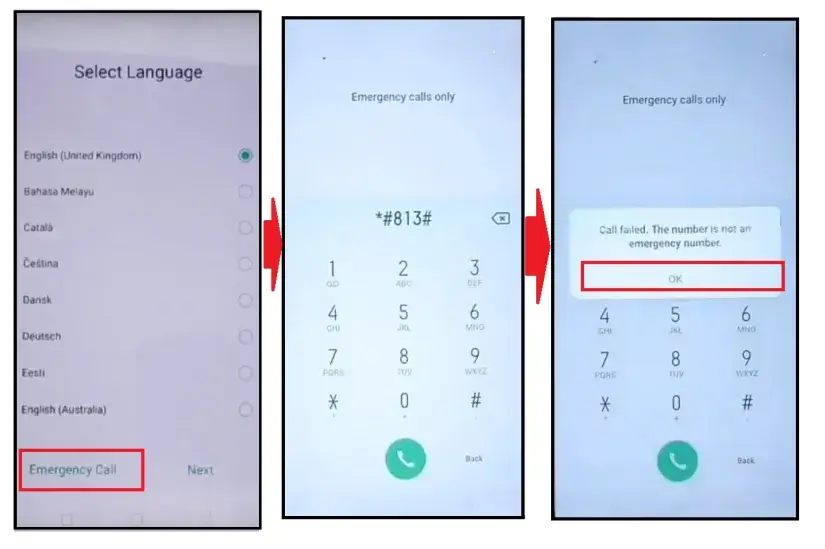
يمكنك تنزيل الاداه من الرابط التالي:
Go to the Download Page
للذهاب لصفحة التحميل
يمكنك من خلال الضغط علي الزر التالي الذهاب لصفحة فحص وتحضير الروابط.
You can go to the link preparation and check page by pressing the button below.
PASS/كلمه السر : mxegy frp
⚡ تنبيه قانوني | Legal Notice:
This tutorial is for educational purposes only. We do not endorse or support any illegal activities. Always ensure that you have the legal right to unlock and modify your device before proceeding with any FRP bypass or account unlocking methods.
هذا الدرس لأغراض تعليمية فقط. نحن لا نؤيد أو ندعم أي أنشطة غير قانونية. تأكد دائمًا من أنك تملك الحق القانوني في فتح وتعديل جهازك قبل المتابعة في أي طرق لتخطي حساب جوجل أو فتح الحسابات.
للمزيد من المعلومات وحل المشكلات الأخرى، يمكنك زيارة موقعنا الرسمي
Your support means the world to me! Whether it’s by sharing, subscribing, watching ads, or contributing in any way – every little bit helps me create more content. Thank you for being part of this journey! ❤️

Top Free Mobile Repair Tools 2025
Discover More Free Mobile Repair Tools of 2025, which include a range of advanced technical solutions. These tools offer the ability to unlock phones,bypass Google account verification, fix IMEI and serial numbers, as well as repair network issues and revive dead boot devices. Whether you’re looking to fix your personal device or need professional tools to assist with mobile repairs, you’ll find a collection of free tools perfect for all of this and more. Read more about each tool to get detailed instructions on how to use them properly. These tools cater to the needs of all users, whether beginners or professionals, and support most brands like Samsung, Huawei, Xiaomi, Oppo, and others.


Comments
Post a Comment